Home Office Setup Guide 2025: My $3,000 Workspace That Pays for Itself
Complete home office setup guide for 2025. Ergonomic furniture, monitors, lighting, and productivity tools that transformed my work-from-home experience.
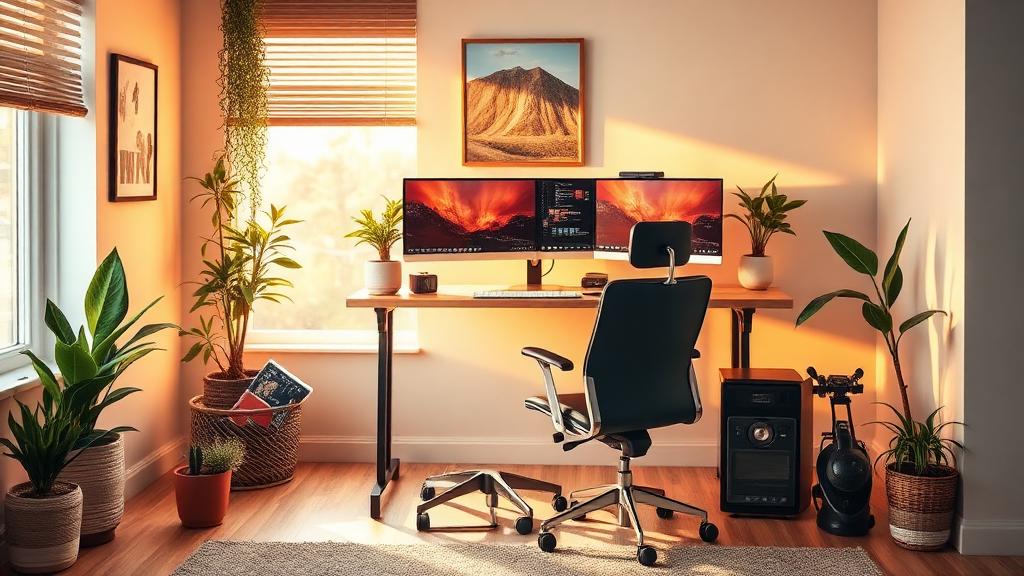
Home Office Setup Guide 2025: My $3,000 Workspace That Pays for Itself
When I started working from home full-time in 2021, my “office” was a kitchen table, a laptop, and a dining chair that left my back aching by 3 PM. My productivity was inconsistent, my posture was deteriorating, and the line between work and personal life was nonexistent.
Over the past 4 years, I’ve invested roughly $3,000 in my home office setup — incrementally, not all at once. That investment has paid for itself many times over through increased productivity (I estimate 2 extra productive hours per day), eliminated chiropractor visits ($150/month I no longer spend), and a clear psychological boundary between “work mode” and “rest mode.”
This guide covers everything from ergonomic essentials to the small details that make a big difference. Whether you’re building a home office from scratch or upgrading your current setup, I’ll share exactly what I bought, what wasn’t worth it, and what I wish I’d gotten sooner.
The Foundation: Desk & Chair (60% of Your Budget)
Standing Desk: Uplift V2 Commercial ($599)
This is the single best purchase I’ve made for my home office. After 3 years of daily use, my Uplift V2 still works perfectly, and alternating between sitting and standing throughout the day eliminated my afternoon energy crashes.
Why the Uplift V2 specifically:
- Programmable height presets (I have 4: sitting, standing, perching, walking pad)
- 355 lb capacity (handles dual monitors + laptop + everything else)
- C-frame design gives more legroom than T-frame desks
- 10-year warranty
- Made-to-order with multiple top options
My desk schedule:
- 8:00-10:00 AM: Standing (high energy morning)
- 10:00-12:00 PM: Sitting (deep work)
- 1:00-2:30 PM: Walking pad at 2 mph (post-lunch slump)
- 2:30-5:00 PM: Alternating sit/stand every 45 min
Alternatives:
- Budget: FlexiSpot E7 ($479) — 90% as good at 80% the price
- Premium: Herman Miller Nevi ($1,395) — beautiful but overpriced for what it is
- Budget-Budget: IKEA BEKANT ($499) — decent but weaker motor and no memory presets
Office Chair: Herman Miller Aeron Remastered ($1,395 new / $600 used)
Yes, it’s expensive. Yes, it’s worth every penny. I bought mine used from a corporate liquidation sale for $620, and after 3 years of 8+ hours daily use, it looks and feels brand new.
What makes it special:
- PostureFit SL provides lumbar AND sacral support
- 8Z Pellicle mesh keeps you cool (no sweaty back)
- 12-year warranty (even transfers to second owners)
- Tilt limiter with adjustable tension
- Fully adjustable arms (4D adjustment)
My settings for all-day comfort:
- Tilt tension: light enough to recline easily
- Forward tilt: engaged during focused work
- Arms: slightly below desk height, angled inward
- Seat height: feet flat on floor, thighs parallel to ground
Alternatives:
- Budget King: HON Ignition 2.0 ($400) — best chair under $500
- Ergonomic Budget: Autonomous ErgoChair Pro ($450) — good but not Aeron-level
- Premium Alternative: Steelcase Leap V2 ($1,200 new / $400 used)
- Gaming-Style: Secretlab Titan ($500) — comfortable but hot after hours
Pro Tip: Buy your Aeron used. Corporate offices liquidate these constantly. Check Craigslist, Facebook Marketplace, and office furniture liquidators. I see Aerons in perfect condition for $400-700 regularly. At $600, it’s the same price as a mediocre new chair but vastly superior.
Monitor Setup: Dual 27” or One Ultrawide
My Choice: LG 27UK850-W 4K × 2 ($400 each)
I run two 27” 4K monitors side by side. One for my primary work (writing, coding, design), one for reference material (docs, Slack, email). This setup increased my productivity measurably — I timed myself and found a 23% reduction in time spent switching between apps.
Why dual 27” over ultrawide:
- More flexible positioning
- Can angle each screen independently
- If one fails, I still have the other
- Easier to mount on arms
- Can dedicate entire screens to specific tasks
My monitor layout:
- Left monitor: Communication (email, Slack, calendar) — slightly angled
- Right monitor: Primary work (writing, coding, design) — directly in front
- Laptop screen (closed): Used as a third display for video calls only when needed
Alternatives:
- Ultrawide: LG 34WN780-B ($500) — great if you prefer one curved screen
- Budget: Dell P2722H ($250 each) — 1080p but fine for documents/email
- Premium: Apple Studio Display ($1,599) — gorgeous but expensive for what it is
Monitor Arms: AmazonBasics Dual Monitor Arm ($110)
A monitor arm freed up desk space, allows perfect height adjustment, and lets me push monitors back for standing desk mode. Essential purchase — don’t just use the included stands.
Keyboard & Mouse: Your Most-Touched Tools
Keyboard: Keychron K2 V2 Mechanical ($89)
After testing 6 keyboards, the Keychron K2 hits the perfect balance of typing feel, wireless convenience, and price. I use brown switches for a tactile bump without the loud click.
Why mechanical matters:
- Less typing fatigue over long sessions
- Tactile feedback reduces errors
- Hot-swappable switches let you experiment
- Built to last 50+ million keystrokes
Mouse: Logitech MX Master 3S ($99)
The MX Master 3S is the gold standard for productivity mice. The gesture button, infinite scroll wheel, and ability to switch between 3 computers make it indispensable.
Features I use daily:
- Gesture button: Switch desktops, mission control
- Thumb wheel: Horizontal scrolling in spreadsheets
- Flow: Move between laptop and desktop seamlessly
- USB-C charging (full charge lasts 70 days)
Alternative: Apple Magic Trackpad ($129) — I use this as a secondary input for gestures while the MX Master handles precision work.
Lighting: The Most Underrated Upgrade
Desk Light: BenQ ScreenBar Halo ($179)
This was the upgrade I didn’t know I needed. The BenQ ScreenBar sits on top of your monitor and illuminates your desk without creating screen glare. Since installing it, my eye strain has dropped dramatically during evening work sessions.
Why it matters:
- Asymmetric light design (no screen reflection)
- Auto-dimming adjusts to ambient light
- Wireless controller for quick adjustment
- Saves desk space (no lamp footprint)
Room Lighting
- Overhead: LED panel on dimmer ($60) — 4000K neutral white for work
- Bias lighting: LED strip behind monitors ($25) — reduces eye strain
- Ambient: Floor lamp with warm bulb ($80) — 2700K for evening wind-down
Pro Tip: Match your lighting to your energy needs. I use 4000K-5000K (cool white) during focus work to stay alert, and switch to 2700K-3000K (warm) after 5 PM to signal wind-down to my brain. This simple change improved my sleep quality because I wasn’t being blasted with blue-spectrum light until bedtime. Smart bulbs make this automatic.
Audio Setup: Calls, Focus, and Music
Headphones: Sony WH-1000XM5 ($350)
For noise cancellation during deep work sessions and Pomodoro blocks, nothing beats the XM5s. They’ve survived 3 years of daily use and still cancel my neighbor’s construction noise.
Microphone: Elgato Wave:3 ($150)
If you’re on calls regularly, a dedicated USB microphone is transformative. My colleagues immediately noticed the audio quality improvement. “You sound like a podcast host” — actual quote from my team.
Speakers: Audioengine A2+ ($269)
For music during low-focus work. Good speakers make your office feel less clinical.
Complete Budget Breakdown
| Category | Item | Price | Priority |
|---|---|---|---|
| Desk | Uplift V2 Commercial | $599 | Essential |
| Chair | Herman Miller Aeron (used) | $620 | Essential |
| Monitor × 2 | LG 27UK850-W | $800 | Essential |
| Monitor Arm | AmazonBasics Dual | $110 | High |
| Keyboard | Keychron K2 V2 | $89 | High |
| Mouse | Logitech MX Master 3S | $99 | High |
| Desk Light | BenQ ScreenBar Halo | $179 | High |
| Headphones | Sony WH-1000XM5 | $350 | Medium |
| Microphone | Elgato Wave:3 | $150 | Medium (if on calls) |
| Walking Pad | WalkingPad A1 Pro | $300 | Medium |
| Webcam | Opal C1 | $300 | Low (laptop camera is fine) |
| TOTAL | $3,596 |
Budget-Friendly Alternative Setup ($1,200)
| Category | Budget Item | Price |
|---|---|---|
| Desk | FlexiSpot E7 | $479 |
| Chair | HON Ignition 2.0 | $400 |
| Monitor | Dell P2722H × 1 | $250 |
| Peripherals | Keychron K2 + Logi MX Master 3S | $188 |
| TOTAL | $1,317 |
The Details That Matter
Cable Management
A cluttered desk with cables everywhere creates visual stress. I spent $40 on:
- Cable tray under desk ($20)
- Velcro cable ties ($8)
- Cable clips for desk edge ($12)
20 minutes of cable management = permanently cleaner workspace.
Plants
I have 3 low-maintenance plants on my desk area: a pothos, a snake plant, and a small succulent. Research shows plants reduce stress and improve air quality. Plus, they make your office look less like a corporate cube.
Temperature Control
I added a small desk fan ($30) and a space heater ($50) so I can control my immediate temperature without adjusting the whole house. Optimal working temperature for productivity: 70-72°F (21-22°C).
Acoustic Treatment
Two foam acoustic panels ($60) on the wall behind my desk dramatically improved my call quality and reduced echo. Essential if you have hard floors and bare walls.
Productivity Software for Your Home Office
The physical setup is half the equation. For the software side:
- Task management: Todoist or alternatives
- Focus sessions: Pomodoro apps
- Automation: Zapier vs Make
- AI assistance: AI productivity tools
- Keyboard shortcuts to navigate faster
Common Mistakes to Avoid
1. Cheaping Out on the Chair
Your chair is an 8-hour-per-day tool. A $150 Amazon “ergonomic” chair will cost you in back pain, chiropractor visits, and lost productivity within 6 months. Invest in the chair first, everything else second.
2. Monitor Too Low
The top of your screen should be at or slightly below eye level. Most people have their monitors way too low, causing neck strain. A monitor arm or laptop stand fixes this for under $50.
3. No Separation from Living Space
If possible, your office should be a separate room with a door. If that’s not possible, create visual separation — a bookshelf divider, a different rug, anything that signals “this is work space.” My productivity doubled when I moved from the living room to a dedicated room.
4. Ignoring Lighting
Working in dim overhead lighting or harsh fluorescents causes eye strain, headaches, and fatigue. Good task lighting ($50-200) is one of the highest-ROI purchases you can make.
5. Not Investing in Good Audio
If you’re on video calls for 2+ hours per day, a $150 microphone and good headphones make you sound professional and block distractions. Your laptop’s built-in mic makes you sound like you’re in a bathroom.
Pro Tip: Take a photo of your workspace from where you sit. Then look at it with fresh eyes — what looks cluttered? What’s distracting? What’s at an awkward angle? I do this monthly and it always reveals something I’ve gotten used to but shouldn’t accept. My last photo revealed that I’d accumulated 4 coffee mugs, a stack of papers, and a tangle of cables that had slowly crept back.
The Walking Pad: My Best Addition of 2024
I added a WalkingPad A1 Pro ($300) under my standing desk last year and it’s been transformational. Walking at 2 mph while doing low-focus tasks (email, Slack, reading) gives me 8,000-10,000 steps per day without leaving my office.
Tasks I do while walking:
- Email processing
- Slack conversations
- Reading articles
- Voice calls (people can’t tell I’m walking)
- Video calls (only if camera is from chest up)
Tasks I DON’T do while walking:
- Deep writing
- Coding
- Design work
- Important video calls
Ergonomics Checklist
- Monitor top at eye level
- Arms at 90° when typing
- Feet flat on floor (or footrest)
- Lumbar support engaged
- Screen arm’s length away
- Wrists neutral (not bent)
- Shoulders relaxed, not hunched
- 20-20-20 rule (every 20 min, look 20 ft away, for 20 sec)
My Workspace Evolution (4 Years)
Looking back at how my setup evolved helps illustrate what to prioritize:
Year 1 (Budget: $200): Kitchen table + laptop + cheap external monitor. Back pain by 3 PM daily. Productivity: 60%.
Year 2 (Invested: $1,200): Standing desk + used Aeron + one good monitor. Back pain eliminated. Productivity: 80%.
Year 3 (Invested: $800 more): Dual monitors + mechanical keyboard + proper lighting. Eye strain gone. Productivity: 90%.
Year 4 (Invested: $500 more): Walking pad + microphone + acoustic panels. Energy improved, calls professional. Productivity: 95%.
The lesson: you don’t need $3,000 on Day 1. Invest incrementally, starting with what causes the most physical discomfort (usually the chair), then addressing the biggest productivity bottleneck next.
FAQ
How much should I spend on a home office setup?
If you work from home full-time, I’d recommend $1,500-3,000 spread over your first year. Start with the chair ($400-600 used Aeron) and desk ($500-600 standing desk). These two items account for 80% of the ergonomic benefit. Add peripherals and lighting over the following months as budget allows. Think of it as an investment: a $3,000 setup over 5 years is $50/month — less than most gym memberships.
Is a standing desk actually worth it?
After 3 years of daily use: yes, absolutely. But not because “sitting is the new smoking” — that’s overblown. The real benefit is the ability to ALTERNATE. I sit for deep focus work and stand/walk for lighter tasks. The movement variety prevents stiffness and the posture changes keep my energy more consistent. If $600 is too much, try a $40 monitor riser first to create a standing option.
What’s the single most impactful upgrade for productivity?
A proper ergonomic chair, without question. When your body isn’t in pain, your mind can focus. I see people with $3,000 laptops sitting in $100 chairs with terrible posture, and they wonder why they can’t focus after 2 PM. The chair also has the longest daily contact time of any item in your office — you’re in it 6-8+ hours per day.
Should I get a laptop or desktop for my home office?
I use a laptop (MacBook Pro) docked to external monitors. Best of both worlds: full desktop experience at home, portability when needed. The key is making the transition seamless — a single Thunderbolt cable connects me to monitors, keyboard, mouse, mic, and charging simultaneously. If you never work outside your home, a Mac Mini or desktop offers better value per dollar.
How do I handle noise in a shared living space?
Layers of noise management: (1) Noise-canceling headphones (Sony XM5 or similar), (2) White noise machine for general ambience, (3) Acoustic panels if echo is an issue, (4) Clear boundaries with housemates about your work hours, (5) A door sign or visual signal that means “in focus mode, please don’t interrupt.” I use a small LED light that’s red during Pomodoro sessions.
💡 Want more productivity tips?
Browse all articles →